
Key takeaways
- Compare the best microphone boom arms with mount types, reach, cable routing and desk clamp notes for winter desks, calls and streaming setups.
Winter pushes work, classes, and play indoors, and the desk becomes the room where calls, recordings, and evening streams all happen. A microphone on a small stand crowds the keyboard, picks up bumps through the desk surface, and drifts out of place each time you tidy up. A boom arm lifts the microphone off the desk, holds it near your mouth, and swings it aside when the day ends.
This guide gathers five desk-mounted boom arms and scissor arms for winter home offices and streaming corners. Each pick mounts to the desk edge with a clamp or an included insert, routes the cable in its own way, and suits a different microphone weight and desk layout. Read the mount and reach notes closely, because a thick edge or a deep monitor shelf can rule out an arm that otherwise looks perfect on paper.
As an Amazon Associate, we earn from qualifying purchases.
Quick answer
For most winter desks, the Rode PSA1+ Professional Studio Arm is the calm, quiet all-rounder, while the Elgato Wave Mic Arm LP White suits on-camera setups that need a low profile. Choose the Samson MBA38 for the longest reach, the TONOR T40LP for a low arm under a monitor, and the InnoGear arm for a folding scissor design.
How to choose
Begin with the desk edge, because every arm in this guide holds on there. Measure the thickness where the clamp will sit, and check for lips, bevels, cable trays, and drawers that block a clamp from closing squarely. A clamp on a flat, square edge stays firm through a season of daily swings, while one forced onto a rounded edge can creep. If your edge is busy, look for an arm that also offers a threaded insert or a flange mount.
Match the arm to the microphone weight you already own, including any mount or adapter. Each listing gives a load figure or a supported weight range, and an arm works best in the middle of that range. A microphone far below the minimum on a strongly sprung arm can rise on its own, while one near the top can sag during a long call. Add microphone, holder, and adapter together before comparing figures, and leave a margin.
Think about height and reach together. A tall scissor arm lifts the microphone up and over a monitor, while a low profile arm runs beneath the shoulder line and keeps the microphone below the camera frame. Measure from the clamp point to where your mouth will be, and compare that with the listed reach, allowing for the bend at the elbow rather than a fully straight line.
Cable routing shapes how tidy the desk stays through winter, when chargers and lamps already compete for space. Some arms hide the cable inside channels with covers, and some rely on ties along the frame. Hidden channels look cleanest on camera, while ties make swapping cables easy. Leave a little slack at each joint so the cable never pulls the microphone out of position.
Finally, consider how often the arm will move. A desk shared between morning calls and evening streaming needs smooth, quiet joints that settle without drifting and without spring noise reaching the microphone.
Rode PSA1+ Professional Studio Arm
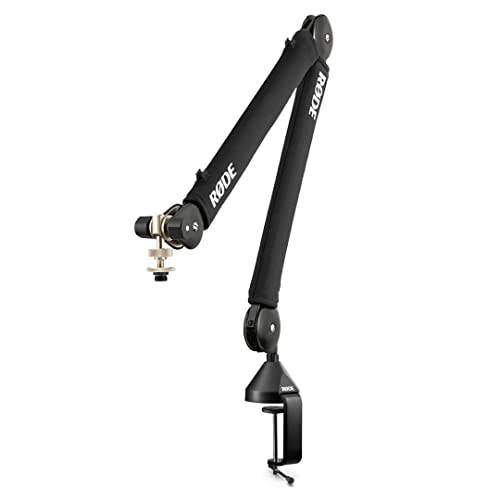
The Rode PSA1+ is the polished all-rounder in this group, built around a parallelogram spring design with fully damped internal springs and a neoprene arm cover. That damping is the point: the arm moves smoothly, settles where you leave it, and keeps mechanical noise away from the microphone. For a winter desk that hosts meetings by day and a stream by night, that quiet behaviour matters every session.
The supported weight range runs from very light microphones up to heavier broadcast models, and the box includes both a desk clamp and a threaded desk insert for a fixed corner. Full rotation lets you swing the microphone in for a call and push it back afterwards, and integrated cable management keeps the lead tidy.
Specs
- Mount: Desk clamp and threaded desk insert included
- Rotation: 360 degrees
- Supported microphone weight: 94 g to 1.2 kg as listed
- Springs: Damped internal springs, parallelogram layout, neoprene cover
- Cable routing: Integrated cable management
- Finish: Black
Elgato Wave Mic Arm LP White

The Elgato Wave Mic Arm LP White is the low profile pick, shaped to sit below the shoulder line so your face stays clear on camera. Its all-metal body runs low across the desk, rising only as far as you set it. For streamers and anyone on video calls through winter, that low line keeps the microphone near your mouth without crossing the picture.
Cable handling is a strength here: magnetic covers close over channels in the arm, hiding the lead while still opening easily when you swap microphones. The clamp expands to grip thicker edges, the arm turns a full circle at base and elbow, and the listed load figure covers most USB and XLR microphones.
Specs
- Mount: Desk clamp, expandable up to 60 mm as listed
- Horizontal reach: 740 mm / 29.1 in as listed
- Rotation: 360 degrees horizontal; 90 degrees up, 60 degrees down at elbow
- Load figure: Up to 2 kg / 4.4 lb as listed
- Cable routing: Magnetic cable channel covers
- Adapters: 1/4 to 3/8 inch and 1/4 to 5/8 inch included
- Construction: All-metal body
Samson MBA38 Microphone Boom Arm

The Samson MBA38 is the long reach option, with an articulating steel arm that extends further than the other picks here. That extra length suits wide desks, corner setups, and rooms where the clamp must sit well away from your chair. Internal springs handle positioning quietly, which helps during live broadcasts and long evening calls.
Mounting choice is the other reason to pick this arm. Alongside the C-clamp for a temporary fit, the box includes a flange mount with wood screws for a permanent fixing. The threading follows the common microphone clip size, and the listed load figure is the highest in this group. Choose it when reach and a fixed mount matter more than a low profile, and note that cable ties will be your routing method here.
Specs
- Mount: C-clamp and flange mount with wood screws included
- Reach: 38 in maximum arm reach as listed
- Construction: Steel
- Springs: Internal springs for quiet positioning
- Threading: 5/8 inch microphone clip threading as listed
- Load figure: Up to 5 lb as listed
TONOR T40LP Low Profile Microphone Boom Arm

The TONOR T40LP takes the low profile idea and applies it to a fully metal arm that runs beneath a monitor. Its horizontal extension covers a typical desk depth while the vertical rise stays modest, so the microphone arrives near your mouth without looming over the screen. For a desk tucked under a shelf, where a tall scissor arm would collide with everything above it, that flat layout solves a real problem.
The metal clamp grips desks up to a generous thickness and uses silicone pads to protect the surface. The base turns a full circle, the listed load figure covers most home microphones, and the box includes cable ties and a thread adapter.
Specs
- Mount: Metal clamp for desks up to 2.76 in / 7 cm thick, silicone pads as listed
- Extension: 30.3 in horizontal, 19.1 in vertical as listed
- Load figure: Up to 1.5 kg / 3.3 lb as listed
- Rotation: 360 degrees horizontal as listed
- Included: Four cable ties, 3/8 to 5/8 inch adapter, microphone clips as listed
- Body: Metal construction as listed
InnoGear Boom Arm Microphone Stand
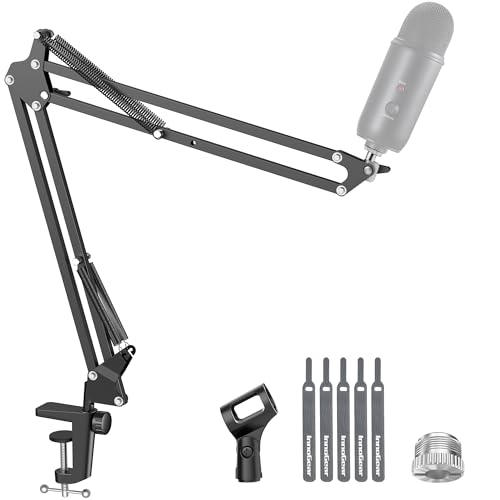
The InnoGear arm is the folding scissor design in this group, made from alloy steel with strong springs and a clamp built for square desk edges. It folds flat and pushes aside when idle, then pulls back for the next call, which suits small winter desks that double as dining tables. The base turns a full circle, the arm shaft swings through a wide arc, and the adapter at the tip tilts to fine-tune the angle.
The listing gives a clear load figure in the middle of this group, names a wide range of compatible microphones, and includes a standard microphone clip. Cable ties route the lead along the frame, keeping swaps simple.
Specs
- Mount: Desk clamp for squared edges up to 2 in thick as listed
- Material: Alloy steel as listed
- Movement: 360 degree base, 180 degree arm shaft, 270 degree adapter tilt as listed
- Load figure: 3.3 lb / 1.5 kg as listed
- Included: Standard microphone clip as listed
- Storage: Folds away when not in use as listed
Who should skip
Skip boom arms altogether if your desk edge cannot take a clamp and you cannot use an insert or flange mount, because every pick here depends on that fixing. A glass desk, a slab beyond the clamp ranges above, or an edge crowded with drawers leaves no safe mounting point, and a plain desk stand will serve you better.
Skip strongly sprung arms if your microphone is very light and the listing gives a minimum weight above it, since the arm may creep upward during calls. Skip the long reach Samson on a shallow desk, and skip low profile arms if you need the microphone high above a tall monitor.
FAQ
Will a boom arm fit my desk if the edge has a lip or bevel?
A clamp needs a flat section of edge to grip, so measure the flat part rather than the full slab. If the lip leaves too little flat surface, choose an arm with a threaded insert or flange mount, or clamp a side edge where the profile is square.
How do I keep the arm from sagging or rising on its own?
Match the microphone weight, including holder and adapter, to the middle of the range the listing gives. An arm that sags carries more than its figure allows, while one that rises carries too little for its springs.
Can one arm serve both work calls and streaming?
Yes, if the joints move quietly and the arm swings easily between positions. Note where the arm sits for each use, keep cable slack at the joints, and choose hidden channels or tidy ties so the desk looks calm on camera.
What thread size does my microphone need?
Many microphones and holders use a 5/8 inch thread, while others use 3/8 inch or 1/4 inch. Several arms here include adapters for the other sizes. Check your thread before ordering, and keep the adapter with the arm.
Final verdict
For most winter desks, the Rode PSA1+ Professional Studio Arm earns the top spot for its damped, quiet movement, wide supported weight range, and choice of clamp or insert mounting. The Elgato Wave Mic Arm LP White is the pick for a clean on-camera look, with magnetic cable channels. The Samson MBA38 wins on reach and mounting choice, the TONOR T40LP suits low headroom under a monitor, and the InnoGear arm folds away for shared desks. Measure your desk edge and weigh your microphone first.
Product and ASIN Reference
| Product | ASIN |
|---|---|
| Rode PSA1+ Professional Studio Arm | B09JBVR5B4 |
| Elgato Wave Mic Arm LP White | B0CBHMYMN9 |
| Samson MBA38 Microphone Boom Arm | B06XY9B3BK |
| TONOR T40LP Low Profile Microphone Boom Arm | B0CRYTR71S |
| InnoGear Boom Arm Microphone Stand | B01L3LL95O |
FAQ
Will a boom arm fit my desk if the edge has a lip or bevel?
How do I keep the arm from sagging or rising on its own?
Can one arm serve both work calls and streaming?
What thread size does my microphone need?
More from Amazon
Programs that pair well with the guide above. Offers and eligibility are set by Amazon and may change.
Free shipping on eligible items, Prime Video and more. Eligible new members can start with a free trial.
Start a Prime free trialAudiobooks and podcasts to listen to on the go. Eligible new members can start with a free trial.
Try Audible freeAd-free music streaming. Eligible new subscribers can start with a free trial.
Try Music Unlimited freeA free business account with business pricing and bulk-buying tools for work, shop or home office.
Create a business accountAs an Amazon Associate we earn from qualifying purchases.



Write Your Review
No reviews yet. Be the first to share your experience!