
Key takeaways
- Compare wireless mice for winter home office days, with multi-device pairing, quiet clicks, scroll wheels, battery types and sizing notes for desk work.
Winter home office days have a rhythm of their own. The light fades early, the desk lamp goes on by mid afternoon, and documents, mail, spreadsheets and calls fill the hours in between. A mouse is in your hand through nearly all of it, scrolling long pages and moving between screens.
The five wireless mice below are office and productivity models, chosen for how they connect, how many machines they can pair with, how the wheel behaves on long documents, how the clicks sound in a quiet room, and how they are powered. Sizes range from a full featured flagship to a slim model for a laptop sleeve.
As an Amazon Associate, we earn from qualifying purchases.
Quick answer
For most winter desk work, the Logitech MX Master 3S leads with a thumb wheel, seven buttons and glass tracking, while the M720 and HP 430 pair with several machines at once. The Signature M650 L suits larger hands, and the Pebble Mouse 2 M350s is the slim, light pick for a small desk or a laptop bag.
How to choose
Begin with the connection. Bluetooth pairing needs no spare port and keeps a small desk tidy. A USB receiver can be simpler on an older machine, since the mouse connects as soon as it is plugged in. A few models here hold pairings for several machines and move between them with a button, handy when two computers share one desk.
Next, think about size and shape. A full size mouse fills the palm and gives room for extra buttons and a thumb wheel, while a slim, low mouse packs easily. Hand size matters more than most spec sheets suggest: a large version of a familiar shape, such as the M650 L below, exists for a reason.
Then look at the wheel and the clicks. A wheel that can move freely through a long document, then settle into neat steps for a spreadsheet, saves time every day. A side thumb wheel helps with wide tables. Quiet click designs lower the noise in a room where calls run through the day.
Power is the final check. Rechargeable models need a cable session now and then. AA models ask for almost no attention for long stretches, and a spare cell in the drawer covers the day one runs flat.
Logitech MX Master 3S Performance Wireless Mouse
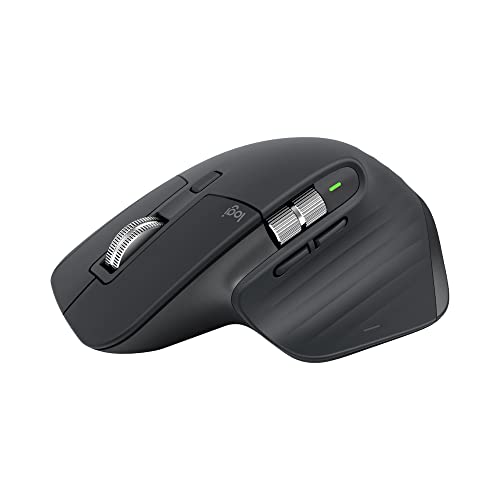
The MX Master 3S is the flagship office model here, built around scrolling and multi button control. The listing describes 8K DPI any surface tracking with a Darkfield high precision sensor, and names glass among the surfaces it can track on, with a minimum glass thickness in the footnotes. For a desk that may be wood one week and glass the next, that range is the main reason to choose it.
Scrolling is where this model puts its effort. Alongside the main wheel there is a thumb wheel for sideways movement through wide spreadsheets, plus a gesture button among its seven buttons. The listing also names Quiet Clicks, with a footnote comparing click sound against the earlier MX Master 3. Power comes from a rechargeable lithium polymer cell, so a charging cable needs to live near the desk.
It connects over Bluetooth Low Energy and, in this version, a Logi Bolt USB receiver. It is a right handed, sculpted shape, so it will not suit a left handed user, and it takes the most desk space here.
Specs:
– Brand: Logitech
– Colour: Graphite
– Connection: Bluetooth Low Energy and Logi Bolt USB receiver
– Sensor: Darkfield high precision, 8K DPI, glass tracking as listed
– Buttons: 7, plus scroll wheel, thumb wheel and gesture button
– Battery: rechargeable lithium polymer, 1 cell included
– Size: 4.92 by 3.31 by 2.01 inches
– Systems: Windows, macOS, Linux, Chrome OS, iPadOS, Android
Logitech M720 Triathlon Wireless Mouse
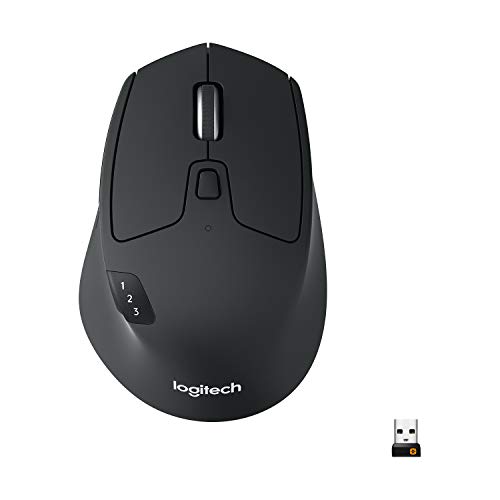
The M720 Triathlon is the long serving multi device model here. Its listing leads with pairing: Bluetooth or the included USB Unifying receiver, with room for more than one machine, so one mouse can serve a work laptop, a home desktop and a tablet. For days that move between a job machine and a personal one, that single pointer keeps the desk clear.
The listing gives a 1000 DPI sensor and six programmable buttons, a simpler control set than the flagship above, with no thumb wheel. Power is simple too: a single AA cell, included, with a battery life of 24 months as listed.
The shape is a full size right handed form in black. If you want multi device pairing and long battery stretches without flagship wheels and extra controls, this is the calm, proven route through the group.
Specs:
– Brand: Logitech
– Colour: Black
– Connection: Bluetooth and USB Unifying receiver
– Sensor: 1000 DPI, as listed
– Buttons: 6 programmable buttons
– Battery: 1 AA cell included; 24 months as listed
– Size: 1.77 by 2.91 by 4.53 inches; 4.8 ounces as listed
– Systems: Windows, Linux, Chrome OS, macOS, iPadOS, Android
Logitech Signature M650 L Wireless Mouse
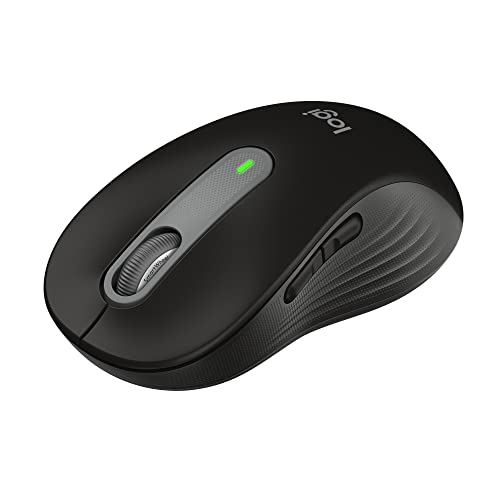
The Signature M650 L is the large hand version of Logitech’s everyday Signature line. The listing describes it as a full size mouse for large sized hands, in black, with silent clicks and customizable side buttons. If a standard mouse feels small by the end of a long winter day, the extra size of the L version is the point of this pick.
Day to day controls are kept simple. There are side buttons you can assign to common actions, and quiet clicks for a room where other people are working nearby. The listing names Bluetooth among its connections and PC, Mac and Chromebook among the machines it serves, with Linux, Mac and PC named on the regional listing page.
Power comes from a battery rather than a charging cable, with an average battery life figure of 24 months as listed. There is no thumb wheel, so this model is about fit and quiet, simple control.
Specs:
– Brand: Logitech
– Colour: Black
– Size class: full size, for large sized hands, as listed
– Connection: Bluetooth, as listed
– Clicks: silent clicks, as listed
– Buttons: customizable side buttons
– Battery: battery powered; 24 months average as listed regionally
– Platforms: Linux, Mac, PC and Chromebook as listed
HP 430 Multi-Device Wireless Mouse

The HP 430 brings multi device pairing to a lighter, simpler mouse. Its listing names Bluetooth 5.2 and a 2.4 GHz USB receiver, so it can pair with a Bluetooth laptop and still serve an older desktop through the receiver. That suits a desk that changes machines often.
The listing gives tracking up to 4000 DPI and four customizable buttons, enough for back and forward navigation plus an assigned action or two. It names Windows, macOS and Chromebook in its title, with MacOS and Windows 10 in the product table, so check your system version before ordering.
Power is a single AA cell, included, with the listing giving a battery life of 2 years. The shape is a straightforward office form rather than a sculpted one, with no thumb wheel or glass tracking claim, so its appeal is pairing range and simplicity.
Specs:
– Brand: HP
– Colour: Black
– Connection: Bluetooth 5.2 and 2.4 GHz USB receiver
– Tracking: up to 4000 DPI, as listed
– Buttons: 4 customizable buttons
– Battery: 1 AA cell included; 2 years as listed
– Size: 4.54 by 2.92 by 1.59 inches; 2.78 ounces as listed
– Systems: Windows, MacOS, Chromebook
Logitech Pebble Mouse 2 M350s

The Pebble Mouse 2 M350s is the small, quiet option here, and the one most likely to travel. The listing describes a slim Bluetooth mouse in black, with a minimalist round shape, quiet clicks and a light build. It suits a shallow winter desk or a bag that moves between rooms.
Small does not mean single machine here. The listing says it can pair with up to three devices and switch between them with the Easy-Switch button. The middle button can be personalized through the Logi Options+ app to assign shortcuts for apps you use often.
The listing describes Silent Touch Technology for its quiet clicks, and notes the plastic parts include certified post consumer recycled plastic, given as 76 percent for the black version. Power comes from a single AA cell, included. There are no side buttons.
Specs:
– Brand: Logitech
– Colour: Black
– Connection: Bluetooth; pairs with up to 3 devices, Easy-Switch button
– Clicks: quiet clicks with Silent Touch Technology, as listed
– Buttons: customizable middle button via Logi Options+ app
– Battery: 1 AA cell required, included
– Size: 4.2 by 2.31 by 1.05 inches; 2.68 ounces as listed
– Materials: recycled plastic given as 76 percent for Black
Who should skip
Skip this whole group if you need a wired connection for a secure workplace machine, since every model here is wireless only. Skip them, too, if your work is fast competitive gaming, or if you need a trackball rather than a moving mouse.
Skip the larger sculpted models if your hands are small, and skip the Pebble if you need side buttons or a thumb wheel. Left handed users should check each shape with care, since several models here are right handed forms.
FAQ
How many machines can one of these mice serve?
It varies by model. The Pebble Mouse 2 M350s listing names pairing with up to three devices and an Easy-Switch button to hop between them. The M720 and the HP 430 are also built around multi device use, through Bluetooth and a receiver. The Signature M650 L is aimed at one main machine.
Do quiet clicks change how a mouse feels?
A little. Quiet click designs lower the sound of each press, which helps in a shared room or on a call. The press itself can feel softer than a standard click, so a non quiet model may suit you more if a firm click matters.
Which power type is simpler for a home office?
Both routes are simple in different ways. A rechargeable model, such as the MX Master 3S, needs a cable session now and then but never a spare cell. AA powered models run for long stretches as listed and only need a drawer spare. Pick the routine you are more likely to keep up with.
Will these mice work on a glass desk?
Only one model here makes that claim. The MX Master 3S listing names glass among its tracking surfaces, with a minimum glass thickness in its footnotes. The other listings do not claim glass tracking, so use a mat with them.
Final verdict
For a winter desk that sees long documents and wide spreadsheets, the Logitech MX Master 3S is the fullest featured pick, with its thumb wheel, seven buttons and glass tracking. The M720 Triathlon remains the calm multi-device choice, and the HP 430 offers similar pairing flexibility in a lighter body. Choose the Signature M650 L when hand size and quiet clicks lead your list, and the Pebble Mouse 2 M350s when the desk is small or the mouse needs to travel. Match shape to hand first, then pairing count.
Product and ASIN Reference
| Product | ASIN |
|---|---|
| Logitech MX Master 3S Performance Wireless Mouse | B0B11LJ69K |
| Logitech M720 Triathlon Wireless Mouse | B087Z6LSHW |
| Logitech Signature M650 L Wireless Mouse | B09KX9P829 |
| HP 430 Multi-Device Wireless Mouse | B09KBN4LNW |
| Logitech Pebble Mouse 2 M350s | B0BT4GFFGR |
FAQ
How many machines can one of these mice serve?
Do quiet clicks change how a mouse feels?
Which power type is simpler for a home office?
Will these mice work on a glass desk?
More from Amazon
Programs that pair well with the guide above. Offers and eligibility are set by Amazon and may change.
Free shipping on eligible items, Prime Video and more. Eligible new members can start with a free trial.
Start a Prime free trialAudiobooks and podcasts to listen to on the go. Eligible new members can start with a free trial.
Try Audible freeAd-free music streaming. Eligible new subscribers can start with a free trial.
Try Music Unlimited freeA free business account with business pricing and bulk-buying tools for work, shop or home office.
Create a business accountAs an Amazon Associate we earn from qualifying purchases.



Write Your Review
No reviews yet. Be the first to share your experience!